
Tuesday, February 25, 2014


Tuesday, January 7, 2014
Thursday, December 1, 2011


Wednesday, March 30, 2011
Evercare Fabric Shaver
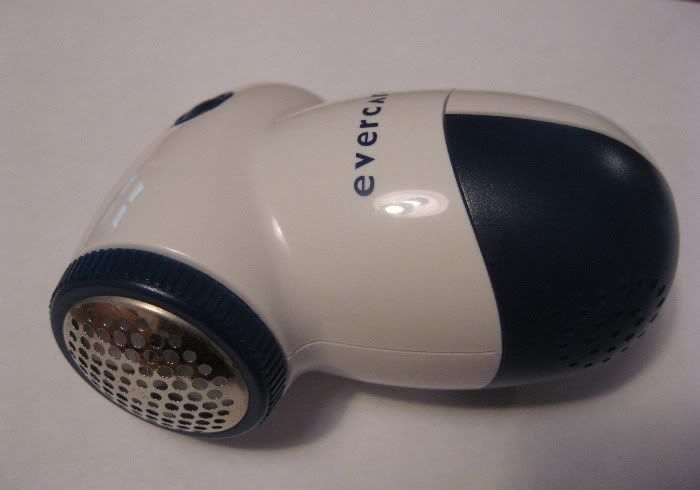
This is a cool item by Evercare that I picked up at Target a while back. It gets rid of pilling on clothing. Pilling for those that don't know what it is are those little cotton balls, or fuzz balls that build up on certain pieces of clothing over time. Mostly found on socks and fleece. When these little balls of cloth build up on socks it can cause "hot spots" and make the socks uncomfortable. Instead of throwing the socks away you can get rid of these little cotton balls with this shaver.
To use you simply turn it on and lightly rub it back and forth and in circles on the piece of clothing. You may have to add a little more pressure for larger pilling, but start light because you don't want to damage the material. When you're done, there is a piece on the front that pops off to empty the shaver.
You can see the before and after pictures....it really works. This version is an older version, but you can still find it here. Newer versions are available just by googling "evercare fabric shaver".
Average price is around $12-13.
Friday, January 29, 2010
Acer Aspire One (updated)

I'm not going to get into a full review as there's just way too many features on this computer. But I'll try to list a few of the main features and functions. I will say that I've been very impressed so far with this laptop. If you plan on putting tons of games and large applications on your laptop I'm not sure I'd go with a factory mini laptop without upgrading it. This laptop has plenty of RAM and memory, but I wouldn't want to load it down with those kinds of things. There is room to expand it's memory as well. It's keyboard isn't that much smaller than your standard keyboard either, so typing isn't too hard to get used to. I really like this laptop and I expect good things from it.
One upgrade my wife got for hers that is helpful is a wireless optical mouse. This is much easier than the typical touch pad mouse included on the computer itself. I like this accessory but I haven't gotten one because it's an extra item I have to carry around. It's nice, though for in home use or for when you can spare the extra room to carry it with you. SD cards are also a good accessory to have for storage of things like pictures, music, etc.
Here are some of the functions and features of this mini laptop:
Operating System: Windows XP Home Edition
Platform: Intel Atom Processor N270
Invilink 802.11b/g Wi-Fi certified network connection
Mobile Intel 82801 GBM chipset
System Memory: Single channel with onboard SDRAM and one soDIMM slot
DDR2 533 MHz SDRAM memory interface design
512 MB onboard SDRAM
Upgradeable to 1GB/1.5GB using one 512MB/1GB soDIMM module
Display: 8.9" WSVGA high brightness CrystalBrite TFT LCD, 1024 x 600 pixel resolution.
LED backlight
LVDS interface
Storage: NAND Flash module: 8GB
Hard Disk Drive: 2.5" 9.5 mm 120GB
Storage expansion: SD card reader supporting SD card, MMC, RS-MMC, Memory Stick (MS), MS PRO, xD.
Supports storage cards with adapter: miniSD, microSD, Memory Stick Duo, Memory Stick PRO Duo.
Audio: High-def audio support
2 built in speakers
MS-Sound compatible
Built-in digital microphone
Communication: Integrated Acer Crystal Eye webcam w/0.3 megapixel resolution
WLAN Acer InviLink Wi-Fi certified network connection
LAN: 10/100 Mbps Fast Ethernet
Power: 30 W adapter w/power cord
24 W 2200 mAh 3-cell Li-ion battery pack (the web site claims 3 hours on this battery, but I've never seen the battery indicator go over 2 1/2 and most times when fully charged it only indicates about 2:05. This indicator isn't real accurate though as sometimes it'll say 2 hours and about an hour later it only says 38 minutes or something like that), I wish this battery life was better, but it works ok for my applications.
I/O ports: Multi-in-1 card reader
SD Card reader for storage expansion
3 USB 2.0 ports
External display (VGA) port
Headphone/speaker/line-out jack
microphone-in jack
Ethernet (RJ-45) port
DC-in jack for AC adapter
One thing I'd like different about the design is the mouse pad. It has an integrated "wheel" area, which is good, but I wish this area was separated somehow, either by indenting this area or some other way of distinguishing this area as the wheel area. Otherwise you sometimes accidentally use the wheel when you're just trying to move the mouse.
Dimensions: 9.8in x 6.7in x 1.14in
Weight: 2.19 lbs w/3 cell battery
Colors: Pink, Brown, White, Blue, Black
Price: Approx. $350
Where to buy
Update: Well...the one you see here in the picture has been returned. The fan started to get so loud that it sounded like a model prop. plane was sitting on my kitchen table. I returned it to Wal Mart with no issues.
The second one I got ran fine for a couple days then started refusing to shut down properly. You either had to unplug it or remove the battery...take away it's power source. Then I opened the internet browser one day and it froze the computer up and remained a blank internet page. This continued so I restarted to the factory settings. The shutdown and internet problem seemed to go away, but when I inserted an SD card into the reader, the reader wouldn't work no matter what I did. I'm not sure if I had used the reader previously in this second one. Well...pack it up and back to Wal Mart we go.
The third model seems to be working fine so far. Although, I suspect this one is a rebuild. My suspicions stem from a small "ding", if you will, on the back side of the monitor. The right mouse key seems loose too. Not as if it's going to fall off, but just doesn't seem right compared to the mouse keys on the first two or the left mouse key on this one....somethings not right with it.
I've heard that part of the problems stem from the Atom processor on this computer instead of a Pentium...I'm not a computer guy (as far as problems and such) so if anyone has any additional comments on these problems please comment.
This isn't a bad computer, but it's definitely not without it's issues. It seems to be a great little computer if you can get one that doesn't have one of the known issues that this particular model has. My wife's seems to be running fine and hasn't had to be replaced yet....hopefully I don't jinx that now. I definitely wouldn't recommend this computer to someone because of the issues I've had recently. I was telling everyone about it and how cool it was, but I've since put a stop to that.
Update (01/29/10) - Well, my wife has had her Acer Aspire One for a little over a year now, and finally, hers bit the dust too. It just stopped working...obviously a hardware issue. When you turn it on, the fan turns on and revs up and down, but the computer itself doesn't work. We have decided to try out MacBooks....so look for that review in the future!
Tuesday, January 12, 2010
Ipod/Iphone Flashlight App.

Recently it was upgraded to include several strobe type flash patterns. Initially I didn't see the usefullness of this, but then it hit me that this would make a great hasty warning device. I'm thinking during a vehicular break down on the side of the road this could be placed in the window or on the bumper when changing a tire, etc, etc. You can change the strobe colors in almost all of the patterns and although this doesn't compare to emergency stobe lights, it does catch the eye and gives additional warning in addition to your 4-ways. These strobes could also be used for signaling during other emergency situations as well
I've found a new and better use for this flashlight app and will keep it on my Ipod for the remainder of the time I have it.
Check the video for a visual of the strobe options.
Tuesday, November 3, 2009
Gorillapod



First off, the Gorillapod came with 3 different attachment options. A screw on option for the bottom of cameras, a adhesive option (2 included), and a suction cup option. Now, you don't need to use one or the other, you can use all of them since these attachment points can be removed from the Gorillapod. When it comes too all these attachment options, they can not only be used for cameras, but also for things like an Ipod, where you may want to have the tripod hold it in place while watching a movie. To remove the mount from the Gorillapod you simply rotate the locking mechanism and push the button and the mount slides right off and another can be put on.
The legs of the Gorillapod are completely flexible. They are basically ball joints. The end of the leg is covered in a rugged rubber cap, and each leg has rubber grips up the length of the leg. The gray parts on the pictures are the rubber grip.
The Gorillapod is very durable and versatile. I like it because you can get your camera at different angles and place it on uneven surfaces. The legs can also be wrapped around railings, tree branches, etc, etc. You can basically place your camera anywhere with the Gorillapod.
The only improvement/change I'd make is to make the suction cup a little better. It takes some playing with to get it to stick. You definitely need to moisten it to get it to work.
If you have a digital camera, a compact tripod is a must. And I highly recommend the Gorillapod. There are different styles, sizes and colors of Gorillapod. The one shown here is the original Gorillapod. Functioning and quality are top notch!!
Price: $21.95
Suggested max camera weight: 11.5 oz.
Colors: Gray, Blue, Green, Orange, Pink, Red, Yellow
Monday, February 16, 2009
TriSquare TSX300 Radio

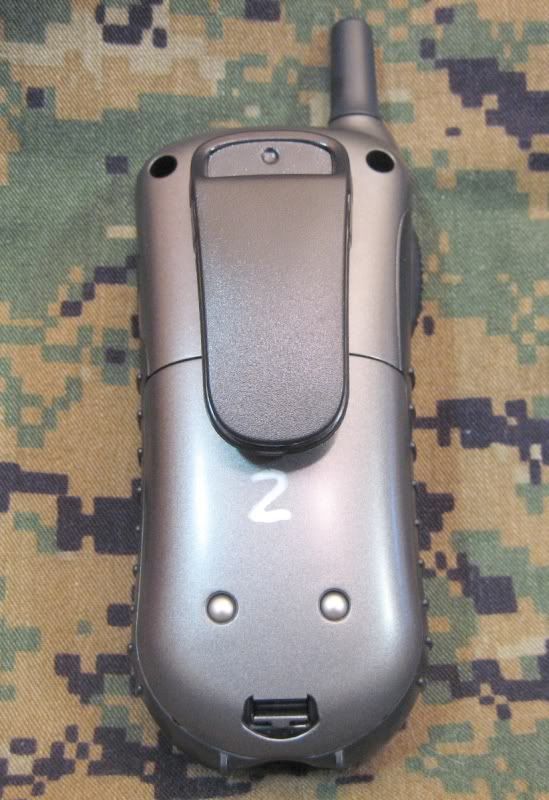


TriSquare currently (as of this posting) has 2 radio styles available... the TSX100 and the TSX300. The TSX100 is the more basic model, with the TSX300 having added features. For this review I'll be covering the TSX300.
What really drew my attention to the TriSquare products, and the TSX300 in particular was the advanced options at a cost that I've seen less advanced radios sell for. The thing that particularly jumped right out at me was the "frequency hopping" capabilities. One piece of gear that I used on a regular basis in the military was the SINCGARS radio. The military makes these radios secure by using frequency hopping. Frequency hopping spread spectrum is when the radios change frequencies in sync with each other. The TSX300 changes frequencies every few tenths of a second and randomly cycles through 50 frequencies. All other radios set to the same channel (10 billion available) will hop frequencies at the same time. This frequency hopping channel allows you to speak uninterrupted and on a secure radio. This technology alone is worth the cost of the radios...but, as they say on the infomercials...there's more...
These radios operate in the 900 MHz spectrum which gives them added range. I haven't had a chance to do some long distance testing on them, but for normal tactical or recreational use they have worked pretty good. They are primarily "line-of-sight" radios, but they work pretty well in the woods and rural areas. Under optimal conditions you can get a few miles out of these radios...but I'd say under normal conditions you can expect a mile or two.
Many radios out there have several channels that you can set your radios to in order to separate groups of people so they can all talk on their own channel...however, these radios have 10 billion channels to choose from. These channels can be programmed into the radio and they can be named so that identification of each "group" is made easy, and just the push of a couple channels changes you through groups. When each person transmits, the persons radio call sign that's been assigned to their radio will show on the receiving radio's screen. Each radio also has a private channel. With the private channels two people can talk person to person without others hearing them.
Another advanced option is cloning. While in close distance to each other the settings of radios can be cloned so that the other radios will all have the same settings. This is very useful for adding a radio to your group and being able to clone all the contacts.
There is a call button on the radios and many different options for the alert. The volume and "ring tone" can be changed and there is also the option of having either the ring tone, the ring tone with vibration alert, or just vibrating alert.
Not only do these radios offer voice communications, you can also send text messages. Just like talking on the radios, you can choose what group or individual private channel you send the text message to. If you can text message on a cell phone, you can use this feature on these radios. They do not have predictive texting, so you have to scroll through the letters. There are pre-stored messages and your sent/received messages are stored in the radio.
If you're out hiking or on an operation and need to know what the weather's going to be like...these radios also have several NOAA weather channels for your local weather forecast.
Included with this radio package are two headsets. The headsets use a rubber coated ear piece that is flexible and can be adjusted to your ear size/shape. They're super comfortable and stay in place pretty good. They have an in-line PTT (push-to-talk) button that has a switch to toggle between PTT and VOX (voice activated). The quality of the transmission suffers a little bit with these headsets, but they offer stealthy transmissions. Even when the call button or text message alerts sound, they sound through the headset instead of the speaker on the radio. The plug-in for this headset is the single pin style.
Battery life is great on these radios. On the included rechargeable batteries you're looking at around 15 hours and approximately 45 hours on 3 AA batteries. This is based on the 5/5/90 duty cycle. The 5/5/90 duty cycle is an industry standard and refers to 5% transmit, 5% receive and 90% standby. Obviously the more you use the radios the shorter the battery life will be. When the radios are in standby they go into low-power mode to help save the battery life.
Charging the rechargeable batteries is made really easy with the included desktop charger. Just drop the batteries or the radios in the charger and a fully drained battery will be fully charged in 12 hours or less. If you happen to leave the radios/batteries on the charger...no problem. The charger is a trickle charger...meaning that once the batteries are charged the power is cut back so that the batteries aren't damaged, but leave a small trickle of power so the batteries don't self-discharge. The radios will also work while in the charger, so if you need to charge the battery while maintaining communications you can do so.
Although these radios aren't waterproof...they've held up quite well in a thunderstorm and several hard rain storms. They weren't protected from the elements and performance was not affected.
Here are a few more features:
- Voice Activation Feature with 3 sensitivity levels.
- Key pad sounds on/off
- Storage of 100 contacts.
- Backlit Dot Matrix LCD screen
- Backlit keypad
- Caller ID
- Call waiting
- Durable design.
- Removable belt clip. The radio can be easily removed from the belt clip when wearing the clip.
- Keypad lock (volume can be adjusted while keypad is locked).
Update (Feb 2010): Now featured in Camo!!


